How do I unlock a user account?
Get a locked-out team member back into Theralytics in under a minute.
Theralytics locks an account after too many failed sign-in attempts to protect client data. An administrator can unlock the account so the user can sign in again without waiting.
Before you start
- You need an Administrator role, or a role with permission to manage users.
- Have the locked user's name.
Unlock the account
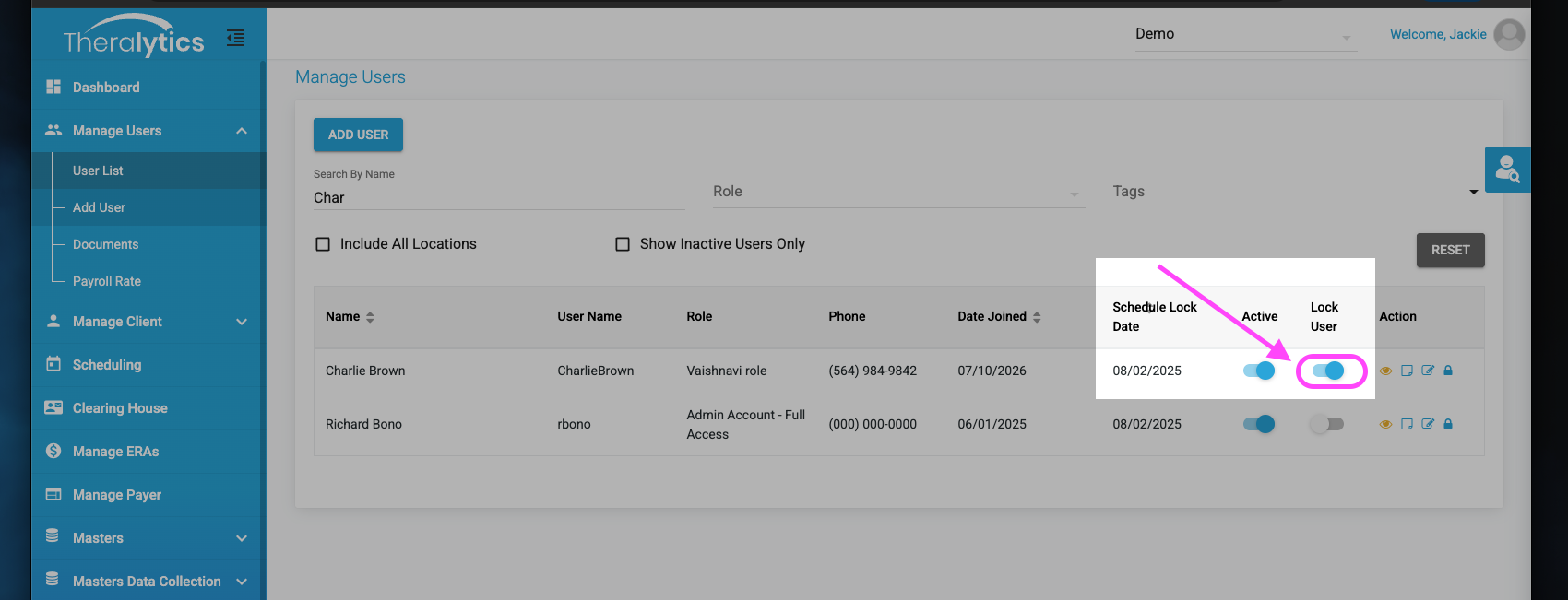
- Go to Manage Users > User List.
- Find the user. Search by name. Locked accounts show a Locked status.
- Click on the toggle labled Lock User.
 Confirm. Click Yes in the pop-up. The status changes to Active.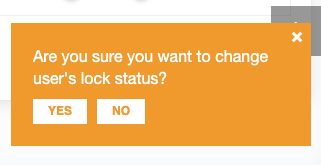
- Let the user know. They can now sign in with their existing password.
Note: If the user doesn't remember their password, unlocking alone won't help. Have them click Forgot Password? on the sign-in page, or send a reset from the user's profile.
Troubleshooting
I don't see the Unlock Account button
Your role may not include user management. Ask an administrator at your organization to unlock the account or update your permissions.
The user is locked out again right away
They're likely still entering an old or saved password. Have them clear saved passwords in their browser or mobile app, then reset their password.
The account shows Inactive, not Locked
Inactive accounts were turned off on purpose, not locked by failed sign-ins. Reactivate the user from their profile instead.
How do I unlock my admin account?
We understand how critical it is to regain your admin access. If another user at your clinic has admin permissions, ask them to unlock your account using the steps above. This is the fastest way to get back in.
If that isn't an option, we're required to complete a verbal identity verification before we can manually unlock your profile.
- Call Theralytics Support at (866) 710-3590. We're available 9:00 AM to 5:00 PM EST, Monday through Friday.
- Wait for a call back. A representative will return your call to verify your details and get you back into the system.
Note: Locked out after hours or over the weekend? Submit a ticket with the subject line URGENT: Admin Locked Out. We'll flag your ticket for immediate attention when we open.
Account lockouts help keep your organization's protected health information (PHI) secure. Don't share sign-in credentials between staff members.
Was this article helpful?
That’s Great!
Thank you for your feedback
Sorry! We couldn't be helpful
Thank you for your feedback
Feedback sent
We appreciate your effort and will try to fix the article