Baseline Criteria lets you define the rules that automatically move a target out of Baseline and into the next status — so targets progress on their own once a client meets the threshold, without anyone manually changing the status. It's set per client and applies to all of that client's targets, and it works hand-in-hand with the Mastery Criteria that take over once a target is in treatment.
Where to Find It
Go to Manage Client --> Data Collection Setup --> Setup.
Open the Baseline Criteria tab (it sits between Prompt Codes and Mastery Criteria).
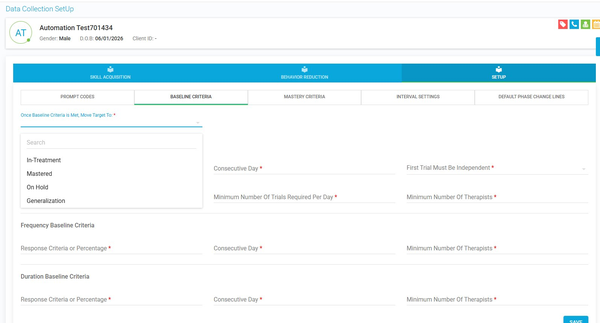
Picture 1. The Baseline Criteria tab, with the "Once Baseline Criteria is Met, Move Target To" dropdown open
Choosing Where the Target Moves
At the top, set "Once Baseline Criteria is Met, Move Target To:" — this required field determines the status a target is given once it meets baseline.
Click the field and pick from the searchable list: In-Treatment, Mastered, On Hold, or Generalization.
Setting the Criteria for Each Target Type
The screen is organized the same way as Mastery Criteria, with a separate block of fields for each recording type. Fill in the blocks that apply to the client's targets, then click Save.
DTT & Task Analysis (the top block):
Response Criteria or Percentage — the portion of correct trials needed (1–100).
Consecutive Day — the number of successive days the client must hit that response level (1–30).
First Trial Must Be Independent — choose Yes or No to decide whether the first trial of each session must be independent for that session to count.
Minimum Number Of Trials Required Per Day — the fewest trials a provider must run that day for the data to count toward baseline.
Minimum Number Of Therapists — the fewest therapists who must collect data for the target to progress.
Frequency Baseline Criteria and Duration Baseline Criteria (each its own block):
Response Criteria or Percentage (1–100)
Consecutive Day (1–30)
Minimum Number Of Therapists
How It Works
While a target is in Baseline, the Baseline Criteria apply. Once it moves into treatment, the Mastery Criteria take over.
If the data meets the Response Criteria or Percentage and all other rules in that block are satisfied, the target moves to the status you chose under "Move Target To" (for example, Generalization).
If the data falls short of the response criteria or any rule isn't met, the target moves from Baseline to In-Treatment instead.
Notes:
Baseline Criteria applies to all target types: DTT, Task Analysis, Frequency, and Duration.
First Trial Must Be Independent and Minimum Number Of Trials Required Per Day apply only to DTT and Task Analysis — the Frequency and Duration blocks don't use them.
Because setup is per client, the same baseline rules apply to every one of that client's targets.
Was this article helpful?
That’s Great!
Thank you for your feedback
Sorry! We couldn't be helpful
Thank you for your feedback
Feedback sent
We appreciate your effort and will try to fix the article