When you sync your clearinghouse, Theralytics pulls the latest files — such as electronic remittances (ERAs) and claim responses — from your clearinghouse into the system. The Sync Clearinghouse window shows this happening in real time as a background job, so you can watch its progress or close the window and let it finish on its own.
Starting a Sync
- From the Clearinghouse area (under Billing), start a sync. The Sync Clearinghouse window opens and a new job begins.
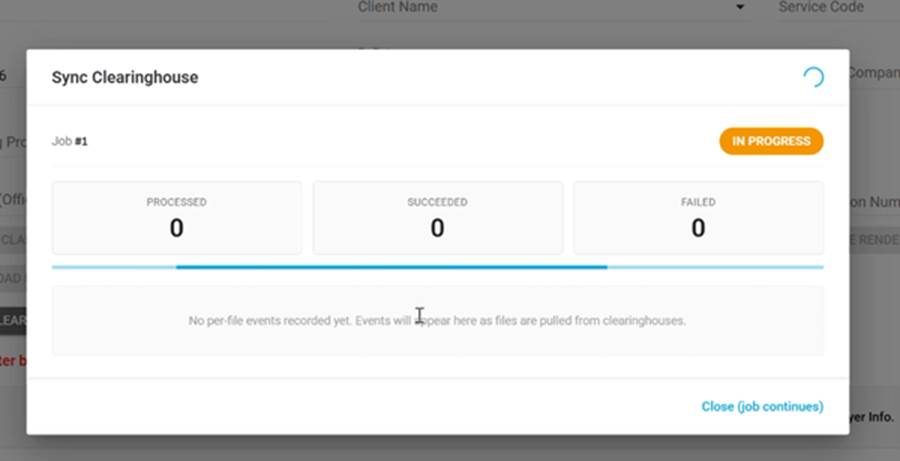
The Sync Clearinghouse window while a job is running
What the Window Shows
- Job number and status — a new run starts every time you click Sync Clearinghouse, and each run is labeled (for example, Job #1) with its own status badge. A running job shows IN PROGRESS. If you click Sync Clearinghouse again while a job is still running, the second run is added as its own job with a QUEUED status and starts once the one ahead of it finishes.
- Processed / Succeeded / Failed — live counts of how many files have been handled, how many were pulled in successfully, and how many failed.
- Per-file events — as each file is pulled from the clearinghouse, an event is added to the list. Until the first file is processed, you'll see "No per-file events recorded yet. Events will appear here as files are pulled from clearinghouses."
Closing the Window Without Stopping the Job
- A sync can take several minutes, so we recommend clicking "Close (job continues)" and letting it run in the background rather than waiting with the window open.
- Closing the window doesn't stop the sync — the job keeps running, finishes on its own, and the results are ready when it's done.
Was this article helpful?
That’s Great!
Thank you for your feedback
Sorry! We couldn't be helpful
Thank you for your feedback
Feedback sent
We appreciate your effort and will try to fix the article