Sometimes during the billing process you may encounter a claim where you can confirm receiving payment but do not see the payment details in Theralytics. This issue usually occurs between the insurer issuing the payment and your Theralytics "fetching" the associated file. Our team has put together some information below to help you locate the file and get it posted between the payer, your software, and the clearinghouse.
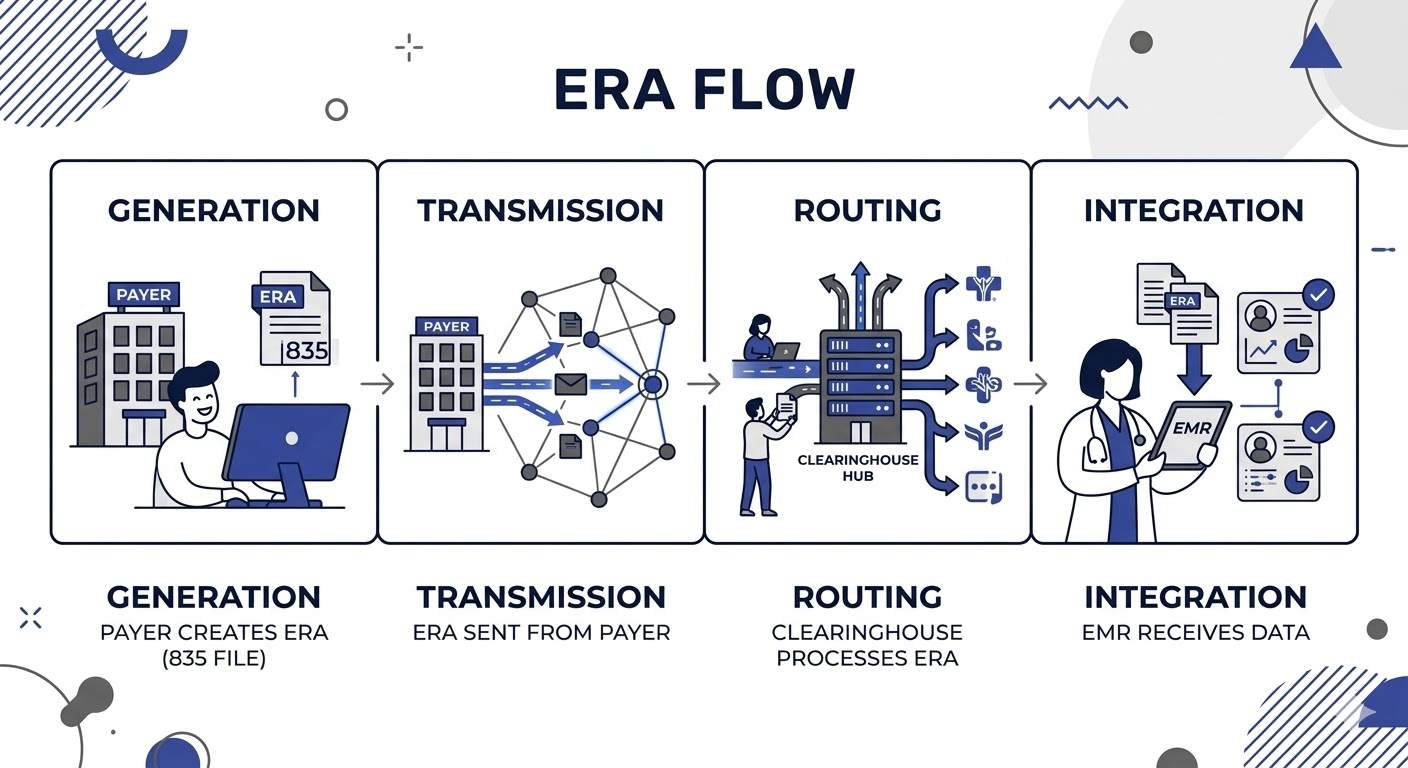
The ERA is essentially the digital version of an EOB and the posting process follows a specific chain.
Generation: Once the payer processes your ABA claim, their system generates a payment (EFT) and a matching data file (835/ERA).
Transmission: The insurer sends that 835 file to their primary clearinghouse (this may be different than the clearinghouse integrated in Theralytics).
Routing: If you use a different clearinghouse (like Office Ally, Claim MD, or Stedi), the file is "hopped" from the insurer's clearinghouse to yours.
Integration: Your EMR software (Theralytis) logs into your clearinghouse, downloads the file, and attempts to "auto-post" it by matching patient and claim info to the record in your system.
If the money has arrived but the ERA is missing, you can use these steps to help identify the cause.
1. Check for Enrollment Gaps
Just because you are enrolled to submit claims doesn't mean you are enrolled to receive ERAs. Many payers require a specific 835/ERA enrollment form that is separate from your EFT (payment) setup.
Log into the Payer Provider Portal or check your enrollment status with your clearinghouse. If you haven't filled out an "ERA Authorization" form specifically for a payer, the ERAs are likely still with the payer or were never generated.
2. Check the Clearinghouse
Sometimes the file reaches your clearinghouse but issues with the file cause problems before it gets to your EMR.
Log directly into your clearinghouse website (outside of your EMR). Search for "Remittance" or "835" files for the last 30 days.
If you see it here, the issue is the connection between your EMR and the clearinghouse. Manually download the file and send it to us (support@theralytics.net) and our team will take a look at the file to determine the cause.
If you DON'T see it there: The clearinghouse never received it from the payer.
3. Confirm the "Reassociation" Timeline
Per CAQH rules, insurers have up to 3 business days of "slack" between sending the money (EFT) and sending the data (ERA).
If you received the payment today, wait 72 hours before troubleshooting.
If you need to call the payer or your clearinghouse, we suggest having the following ready:
Check/EFT Number and Payment Date.
Payment Amount.
Your Tax ID (TIN) and NPI.
The "Trace ID" (available from your bank's ACH transaction details).
Was this article helpful?
That’s Great!
Thank you for your feedback
Sorry! We couldn't be helpful
Thank you for your feedback
Feedback sent
We appreciate your effort and will try to fix the article