You can now filter Session Note Documents by two new statuses — Pending Signature and Pending Completion — so you can quickly find the notes that still need action. These replace the single, less specific Pending status.
Filtering Session Note Documents
Go to Manage Client --> Session Note Document.
Open the Status dropdown and choose Pending Signature (written but awaiting a signature) or Pending Completion (still needs completing). The list refreshes automatically.
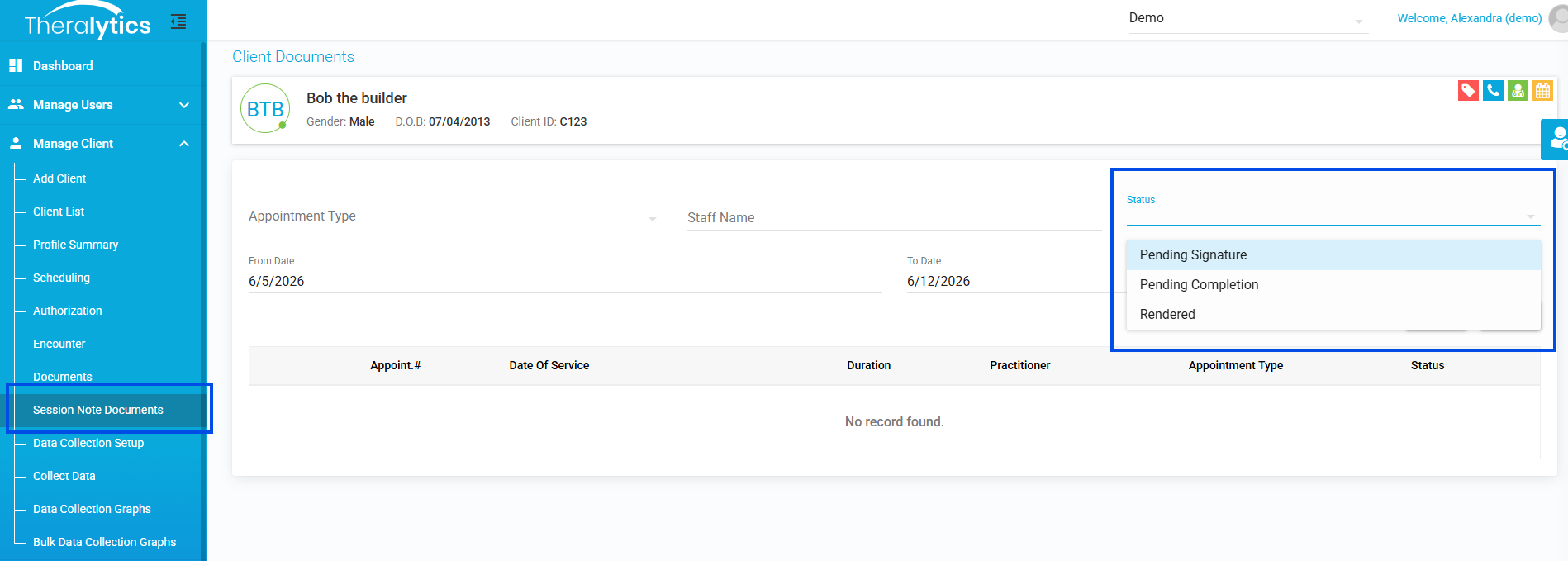
Picture1: Session Note Documents Status dropdown with the new statuses
Including Pending Sessions on the Report
Go to Reports --> Audit Tools --> Session Notes.
Check Show Pending Appointments (previously Show Unrendered Appointments) and generate the report.
Notes:
The old Pending status has been removed — use Pending Signature or Pending Completion instead.
Was this article helpful?
That’s Great!
Thank you for your feedback
Sorry! We couldn't be helpful
Thank you for your feedback
Feedback sent
We appreciate your effort and will try to fix the article